 Slice Away!


How to Play Slice Away! - Physics Puzzle
Swipe through a cuttable object so its pieces can fall into the grinder. Use the move counter to budget your cuts, and look at the path through the obstacles before you move your finger.
Gameplay video
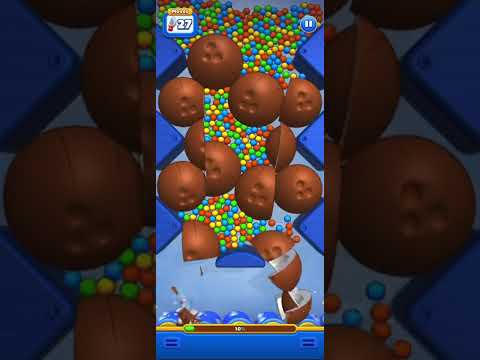
Video by Nhung Nguyen Thi Tuyet on YouTubeWatch on YouTube
Learn the board before the gesture
Find the move counter, the pause button, and the grinder. In the store images the counter is at the top left, pause is at the top right, and the grinder spans the lower edge. The space between the objects and the grinder is your working area. Objects can be stacked together, supported by blue fixtures, or held in a channel that narrows as it goes down. Find a path from the bottom row of pieces to the grinder before planning the rest of the board.
A useful start is to find one object with air below it. It gives you a clear view of how cuts and falls work because you can watch it separate without several overlapping collisions. Then try a board where an obstacle interrupts that path. Compare the two results. The important change is the space the edges of a fragment have available once it starts to rotate or slide.
Draw the cut
Set the start and end of the swipe so the line actually crosses the part of the object you want to remove. Think of the line as the boundary between the resulting pieces. A line that only skims a round edge may yield a tiny slice while leaving the main piece largely intact. That can be worthwhile when the edge is the part resting on a ledge. If the entire object is too wide for a gap, use a deeper cut that leaves both pieces narrow enough to move.
Consider the side of the cut nearest the opening. If the left side of a fruit sits on a block and there is room on its right, a cut can release a right-hand piece into the gap. The part still touching the block may need another move. When both halves have a route, one swipe can do more work. Check both sides before picking an angle, especially when a board allows you to be precise.
Route the piece through more than one opening
On a board with several blue triangles, start by tracing toward the lowest one. A piece that reaches the first opening may still land flat on the next ledge. Look for the narrowest part of the whole route. If you make fragments that fit this point as well as the opening immediately below them, you have a better chance of spending one move instead of revisiting the same fragment farther down.
On the board with long curved supports, study the lower end of each curve. A round object can change direction when it hits a sloping or curved wall. A cut can reduce the width of the shape or give it a flatter side that behaves differently. Guide your choice by the space visible beside the wall. If one side has more room, send the separated piece that way and see what the remaining part does.
Watch what moves after the cut
Gravity works on the pile after a swipe. Support at one point can be holding several other objects still, and those pieces can slide or roll when that support changes. Look at the space that opens as well as the object you cut. A falling fragment can bump another piece onto a new route. If two objects jam lower down, their new shape and positions tell you where to spend the next cut.
The last object visible on a board is not always the only one left. Small offcuts can settle near blue corners or at the edge above the grinder. Scan along both sides and the bottom after the movement ends. If the board has a progress display, use it to confirm that there is still work to do, then look for the piece that remains in the play area.
Budget your moves across the board
Check how many moves remain before trying to make every cut perfect. With a generous allowance you can split one blocked item, observe how it falls, and adjust the next cut. With fewer moves left, look for swipes that release a support or free a route for more than one item. A clean-looking slice through a piece that could already fall may spend the move you need later to clear a fragment.
If an attempt stalls, remember the first place material stopped moving. On your next try, change the cut that created that shape. For example, if a flat piece ended up spanning two supports, try a line that makes a smaller piece beside one support. If the fruit from above arrived before the lower gap was clear, open that gap first and then release the heavier pieces. Compare the difference after each swipe so you can identify which change helped.
Match the example to what you see
The gameplay example shows several arrangements from the same game, including a pile of striped balls and boards crowded with fruit. When comparing footage with your own screen, match the outline of the walls, the biggest object and the location of the grinder. Two boards with similar fruit may behave differently if one has a central peg or an extra ledge. Use the example to study movement and move order, then adapt to the geometry in front of you.